For FSO operators
A guided, offline-capable app for the person on the vessel. Wizard-driven first-run setup, obvious buttons for baseline ROB and transfer/restock entry, and a signed export back to the Trader when the job is done.
Product status
The pages below describe the shipping workflow and blend methodology in detail. The charter-linked price list is published on the Pricing page, and Paddle checkout for all MWB SKUs is enabled — signed installers for the Trader, FSO, and FSO Monitor are delivered by email immediately after purchase. See the Software delivery page for how the three-installer pack arrives.
MaeWest Blending · Trader & FSO — charter-linked
MaeWest Blending connects the shore Trader and vessel FSO applications. It sits alongside MaeWest Cargo Operations for Office and Field workflows and MaeWest Surveyor for independent field reporting.
The shore Trader issues signed blend and transfer instructions; the vessel FSO records what actually happened and returns a signed ROB snapshot and execution report. No live network, no shared server — just verifiable file bundles that travel by USB, email, or network share.
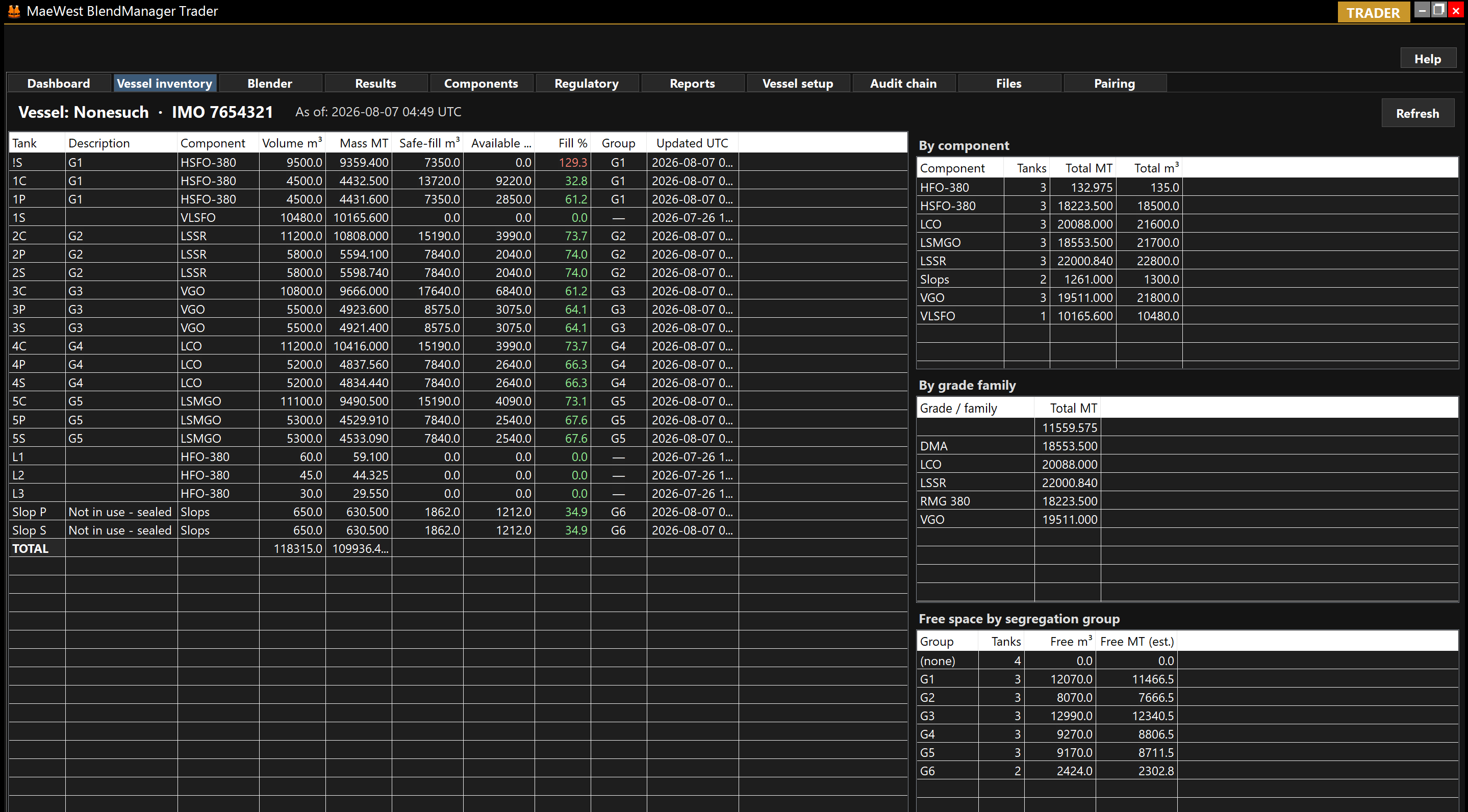
A guided, offline-capable app for the person on the vessel. Wizard-driven first-run setup, obvious buttons for baseline ROB and transfer/restock entry, and a signed export back to the Trader when the job is done.
Author blend and transfer instructions with your own wording — no app-generated pro-forma text — and receive verifiable ROB snapshots and un-shipped-item reports from every FSO you charter.
Every instruction, execution, and ROB snapshot is content-hashed and chained. The full history can be independently re-verified at charter close-out or during a dispute.
Trader — the built-in blend calculator
Most FSO shore desks still blend in a spreadsheet inherited from someone who left the company two charters ago. The Trader app replaces that spreadsheet with a first-class blend engine designed for ISO 8217 marine fuels — VLSFO, HSFO, ULSFO, MGO — that shows its working and signs the result.
Kinematic viscosity is blended with the Refutas / ASTM D341 (MacCoull–Walther) viscosity blend number on a mass basis, and the temperature-corrected variant follows ASTM D7152. No linear-averaging shortcuts — the answer matches what an accredited lab will report on the certificate of quality.
Flash point is combined via the Chevron / API flash blending index (Nelson form); pour point via the Chevron / Riazi pour-point index. Both are the industry-standard non-linear methods and are labelled as such in the on-screen breakdown.
Mass-weighted sulphur (mass %), density at 15 °C (kg/m³), water, sediment, ash and metals (V, Na, Al+Si, Ni, Fe, Ca, Zn, P) on ISO 8217 bases. Every input is either a measured component value or a supplier-certified reference.
Pick a target grade (RMG 380, RMK 500, DMA, DMB, VLSFO 0.50 %S, ULSFO 0.10 %S…) and the blender shows pass/fail against every property in the table, with the individual margin on each parameter so the Trader knows where the headroom is.
The sulphur result is checked against the correct cap for the operating zone — 0.50 % global cap, 0.10 % ECA (SECA) — and flagged if the blend would breach the applicable regulation for the intended voyage.
A live spec badge on the Blender tab summarises the current blend at a glance. “Show full spec…” opens the complete property table, and one click emits a Certificate of Quality PDF with a QR verification block encoding the instruction hash and audit-chain head — independently checkable downstream.
The blending math lives in a separate, testable calculation library with a golden-value regression suite; every method above is documented in-code with its source equation so a marine chemist or vetting inspector can trace the arithmetic without reverse-engineering a spreadsheet.
Prediction accuracy. Sulphur, density, MCR and metals are mass-weighted and mathematically exact. Viscosity, flash and pour are non-linear index blends (Refutas / Chevron / ASTM-family) with a ±10–20 % method envelope, confirmed on the receiving-end lab CoQ. Every release is regression-tested against textbook worked examples and ISO 4259 reproducibility bands — see the methodology & validation page.
Trader — restock planning surface
The Trader includes a dedicated planning surface for restock scenarios — a “what if I bought these parcels and put them in these tanks” workbench that computes projected tank quality and fleet capacity before anything is signed, ordered or executed. It is separate from the audit chain: scenarios can be saved, loaded, duplicated and compared freely; only Promote to Issue hands the plan to the signed-instruction pipeline.
Add candidate parcels (component, destination tank, quantity) and press Refresh preview. The projected post-restock quality of each affected tank is shown using either the supplier CoQ if you already hold one, or the component master’s nominal values if you are still shopping. No FSO round-trip required.
Tick Replace tank on any line to model a tank being drained and repurposed to a different component — the classic HSFO → MGO or distillate → residual switch. The projected quality is computed from the incoming parcel(s) only, not blended with the outgoing stock, and a soft banner reminds you a drain/clean has to be arranged on the vessel side.
A per-component roll-up under the line grid shows tanks, capacity in metric tonnes, and current inventory before and after the scenario. Instantly answers “how much MGO storage will I have across the vessel if I do this?” and highlights any tank whose component ownership changes.
Save up to three scenarios and open the Compare view. Each column shows the same fleet capacity roll-up against a common baseline, with arrow deltas per component so the trade-offs between two purchase strategies are visible in a single glance.
When one scenario wins, Promote to Issue opens the Issue Restock dialog pre-populated with every line and the Replace-tank flag intact. Add a reference, sign, and the plan enters the normal audit chain — identical downstream to any hand-typed restock instruction.
Scenarios live as local JSON files under Documents\MaeWest BlendManager\Trader\Scenarios\. Nothing is transmitted, nothing is anchored to the hash chain, nothing is chargeable. Trial-and-error is meant to be cheap and reversible — the signed pipeline picks up only when a plan is promoted.
The same mass-weighted math powers both the projection preview and the post-execution derivation, so what the trader sees during planning matches what the deriver stamps onto the synthetic tank component once the FSO returns its executed bundle.
How it works
The shore Trader writes the blend or transfer instruction in their own words, signs it, and exports a bundle file. Nothing is transmitted automatically — the file is sent to the vessel by the operator’s preferred route.
The FSO app verifies the signature, warns if the file has been tampered with, and shows the Trader’s wording alongside the tanks and components requested.
The operator ticks the tanks that actually moved, enters observed ullages, densities, free water and S&W, and signs the execution. A carry-forward of unchanged tanks is included automatically.
The Trader imports the returned bundle, sees the executed vs. requested comparison, and files the ROB snapshot into the vessel’s signed history.
Built for a first-time operator
FSO deployments change hands: new vessel, new crew, new Charter Party. The app is designed so a first-time operator can be productive on day one, without hunting through admin tabs or waiting for the first Trader instruction to arrive.
On first launch the FSO app opens a four-step wizard: welcome, vessel identity, tank layout, and a first baseline ROB. Each step has a “Do it now” button that jumps straight to the right screen.
One button on the Overview tab captures a full-vessel baseline from an independent Inspector’s report — the reliable starting point for every subsequent transfer.
Not every movement comes from a Trader instruction. A prominent button lets the operator record a signed transfer or restock (restock is just a Load transfer — the app makes that clear).
Both FSO and Trader ship with a Demo mode button so operators can rehearse the full round-trip on synthetic data without touching real charter records.
Charter-linked, re-usable
An FSO deployment is time-boxed by its Charter Party — typically six to twelve months. The app is fully reconfigurable at charter roll-over: new tank layout, new vessel identity, new Trader counterparty, with the signed audit chain preserved.
Pricing is an annual per-vessel subscription that runs while the charter is live and can be renewed, paused, or reassigned when the next charter begins. When a subscription ends, an inexpensive archive licence keeps the signed history readable and exportable for auditors.
Launch readiness